How it works
A coding agent turns a request into working screens by reusing the catalog. Pick a recorded run and step through it, from the result back to the request.
Recorded runs
The request
A new app, described in plain words.
“New project: a billing admin with usage against quota and alerts, a plan comparison for changing plans, and recovery of failed payments (dunning). No real payment processor; use sample data.”
English translation of the recorded prompt.
Project inspection
The CLI profiles the project and its design tokens; the agent reads that profile over MCP before choosing anything.
- agentic-ui init
- agentic-ui analyze
Found a new greenfield Next.js project on shadcn-radix.
Technical details
understand_project answered in 700 ms. Design system detected: shadcn-radix.
Catalog search
One search per need, by intent, over the local MCP server. Results are ranked by relevance and quality.
- “billing usage meter with quota”→ billing-usage-meter · 0.92
- “plan comparison upgrade”→ billing-plan-comparison · 0.89
- “failed payment dunning recovery”→ billing-dunning-states · 0.63
Technical details
recommend_patterns {"task":"billing usage meter with quota","limit":5,"filters":{"distributable_only":true,"variant":"new-york"}}
#1 billing-usage-meter · relevance 0.92 · quality 9.2
#2 ai-usage-meter · relevance 0.83 · quality 9.2
#3 ai-usage-policies · relevance 0.58 · quality 9.2
recommend_patterns {"task":"plan comparison upgrade","limit":5,"filters":{"distributable_only":true,"variant":"new-york"}}
#1 billing-plan-comparison · relevance 0.89 · quality 9
#2 billing-pricing-table · relevance 0.50 · quality 9
#3 core-settings-plans · relevance 0.89 · quality 9.5
recommend_patterns {"task":"failed payment dunning recovery","limit":5,"filters":{"distributable_only":true,"variant":"new-york"}}
#1 billing-dunning-states · relevance 0.63 · quality 9.2
#2 payments-dashboard-overview · relevance 0.42 · quality 8.25
#3 ai-tool-call-card · relevance 0.38 · quality 9.2
Component selection
The components used, each one found by the search above.
Installation
The CLI installs each component through shadcn and rewrites its tokens to the project's; existing files are kept.
- agentic-ui add billing-usage-meter
- agentic-ui add billing-plan-comparison
- agentic-ui add billing-dunning-states
- agentic-ui add motion-button-press
56 files added in total.
Technical details
- billing-usage-meter: 36 files added · 2 token rewrites
- billing-plan-comparison: 3 files added · 0 token rewrites · 1 existing kept
- billing-dunning-states: 6 files added · 0 token rewrites · 1 existing kept
- motion-button-press: 11 files added · 1 token rewrites
Verification
The skill's inspect step checks the result; a failing draft is refined before it counts.
- Type check of the installed code
- Production build
- No overflow at 390 px
- Reduced motion respected
First draft failed: motion-check, responsive. The refined iteration passed.
Technical details
13 of 13 evaluation metrics passed · verdict PASS.
Full recorded trace of this run
Recorded in the product's agent evaluation (Radix UI): a scripted agent runs the shipping CLI, MCP server and skills against a clean project. The case sets the request, the components to install and the screen code; the tool calls, installs and checks are real.
The developer's request
New project: a billing admin with usage against quota and alerts, a plan comparison for changing plans, and recovery of failed payments (dunning). No real payment processor; use sample data.
English translation of the recorded prompt · case billing-admin
The agent inspects the project
agentic-ui init
agentic-ui analyze
Found a greenfield Next.js project using shadcn-radix; the MCP server was registered and
understand_projectread its profile (700 ms).It searches the catalog over MCP
recommend_patterns “billing usage meter with quota”
- #1 billing-usage-meter relevance 0.92
- #2 ai-usage-meter relevance 0.83
- #3 ai-usage-policies relevance 0.58
recommend_patterns “plan comparison upgrade”
- #1 billing-plan-comparison relevance 0.89
- #2 billing-pricing-table relevance 0.50
- #3 core-settings-plans relevance 0.89
recommend_patterns “failed payment dunning recovery”
- #1 billing-dunning-states relevance 0.63
- #2 payments-dashboard-overview relevance 0.42
- #3 ai-tool-call-card relevance 0.38
The components used, each found by the search
The case sets which components to install; the evaluation checks that the search returns each of them among its top results.
The CLI installs and adapts them
agentic-ui add billing-usage-meter
36 files added · 2 token rewrites
agentic-ui add billing-plan-comparison
3 files added · 0 token rewrites · 1 existing file kept
agentic-ui add billing-dunning-states
6 files added · 0 token rewrites · 1 existing file kept
agentic-ui add motion-button-press
11 files added · 1 token rewrites
The screens are composed and checked
Type check of the installed code
Production build
No overflow at 390 px
Reduced motion respected
The first draft failed motion-check and responsive; the inspect step caught it and the refined iteration passed.
13 of 13 evaluation metrics passed · verdict PASS.
The request
A new app, described in plain words.
“New project: a screen that shows an agent's execution trace (thoughts, tool calls and result), the run status, a "thinking" indicator and progress by stage, plus a view of the failed run with a retry.”
English translation of the recorded prompt.
Project inspection
The CLI profiles the project and its design tokens; the agent reads that profile over MCP before choosing anything.
- agentic-ui init
- agentic-ui analyze
Found a new greenfield Next.js project on shadcn-radix.
Technical details
understand_project answered in 659 ms. Design system detected: shadcn-radix.
Catalog search
One search per need, by intent, over the local MCP server. Results are ranked by relevance and quality.
- “agent execution trace with tool calls and run status”→ ai-agent-run-trace · 0.64
- “streaming typing indicator for agent thinking”→ ai-streaming-message · 0.57
- “pipeline progress stages for agent run”→ ai-agent-run-trace · 0.40
Technical details
recommend_patterns {"task":"agent execution trace with tool calls and run status","limit":5,"filters":{"distributable_only":true,"variant":"new-york"}}
#1 ai-agent-run-trace · relevance 0.64 · quality 8.7
#2 ai-workspace-message-item · relevance 0.55 · quality 9.35
#3 ai-tool-call-card · relevance 0.67 · quality 9.2
recommend_patterns {"task":"streaming typing indicator for agent thinking","limit":5,"filters":{"distributable_only":true,"variant":"new-york"}}
#1 ai-streaming-message · relevance 0.57 · quality 9.2
#2 motion-typing-indicator · relevance 0.40 · quality 9.125
#3 ai-agent-run-trace · relevance 0.37 · quality 8.7
recommend_patterns {"task":"pipeline progress stages for agent run","limit":5,"filters":{"distributable_only":true,"variant":"new-york"}}
#1 ai-agent-run-trace · relevance 0.40 · quality 8.7
#2 motion-progress-animated-segmented · relevance 0.37 · quality 8.55
#3 ai-workflow-test-input · relevance 0.50 · quality 9.2
Component selection
The components used, each one found by the search above.
Installation
The CLI installs each component through shadcn and rewrites its tokens to the project's; existing files are kept.
- agentic-ui add ai-agent-run-trace
- agentic-ui add motion-typing-indicator
- agentic-ui add motion-progress-animated-segmented
51 files added in total.
Technical details
- ai-agent-run-trace: 36 files added · 1 token rewrites
- motion-typing-indicator: 12 files added · 1 token rewrites
- motion-progress-animated-segmented: 3 files added · 0 token rewrites · 1 existing kept
Verification
The skill's inspect step checks the result; a failing draft is refined before it counts.
- Type check of the installed code
- Production build
- No overflow at 390 px
- Reduced motion respected
First draft failed: reduced-motion. The refined iteration passed.
Technical details
13 of 13 evaluation metrics passed · verdict PASS.
Full recorded trace of this run
Recorded in the product's agent evaluation (Radix UI): a scripted agent runs the shipping CLI, MCP server and skills against a clean project. The case sets the request, the components to install and the screen code; the tool calls, installs and checks are real.
The developer's request
New project: a screen that shows an agent's execution trace (thoughts, tool calls and result), the run status, a "thinking" indicator and progress by stage, plus a view of the failed run with a retry.
English translation of the recorded prompt · case agent-execution-trace
The agent inspects the project
agentic-ui init
agentic-ui analyze
Found a greenfield Next.js project using shadcn-radix; the MCP server was registered and
understand_projectread its profile (659 ms).It searches the catalog over MCP
recommend_patterns “agent execution trace with tool calls and run status”
- #1 ai-agent-run-trace relevance 0.64
- #2 ai-workspace-message-item relevance 0.55
- #3 ai-tool-call-card relevance 0.67
recommend_patterns “streaming typing indicator for agent thinking”
- #1 ai-streaming-message relevance 0.57
- #2 motion-typing-indicator relevance 0.40
- #3 ai-agent-run-trace relevance 0.37
recommend_patterns “pipeline progress stages for agent run”
- #1 ai-agent-run-trace relevance 0.40
- #2 motion-progress-animated-segmented relevance 0.37
- #3 ai-workflow-test-input relevance 0.50
The components used, each found by the search
The case sets which components to install; the evaluation checks that the search returns each of them among its top results.
The CLI installs and adapts them
agentic-ui add ai-agent-run-trace
36 files added · 1 token rewrites
agentic-ui add motion-typing-indicator
12 files added · 1 token rewrites
agentic-ui add motion-progress-animated-segmented
3 files added · 0 token rewrites · 1 existing file kept
The screens are composed and checked
Type check of the installed code
Production build
No overflow at 390 px
Reduced motion respected
The first draft failed reduced-motion; the inspect step caught it and the refined iteration passed.
13 of 13 evaluation metrics passed · verdict PASS.
The request
An existing app to improve, with what must not change.
“Existing CRM (from 2019, raw palette, a contacts table that overflows on phones): modernize the dashboard, contacts and deals in balanced mode, keeping the violet brand, the lib/crm-api.ts adapter and the routes.”
English translation of the recorded prompt.
Project inspection
The CLI profiles the project and its design tokens; the agent reads that profile over MCP before choosing anything.
- agentic-ui init
- agentic-ui analyze
Found an existing saas Next.js project on shadcn-radix.
Technical details
understand_project answered in 678 ms. Design system detected: shadcn-radix.
Catalog search
One search per need, by intent, over the local MCP server. Results are ranked by relevance and quality.
- “contacts table responsive on mobile with filters”→ responsive-table-to-cards · 0.67
- “filter sidebar facets by stage and owner”→ search-faceted-sidebar · 0.56
- “CRM pipeline deals kpi”→ dashboard-kpi-goal · 0.38
Technical details
recommend_patterns {"task":"contacts table responsive on mobile with filters","limit":5,"filters":{"distributable_only":true,"variant":"new-york"}}
#1 responsive-table-to-cards · relevance 0.67 · quality 9
#2 table-pivot-basic · relevance 0.53 · quality 9
#3 ecommerce-product-list-responsive-table · relevance 0.57 · quality 8.25
recommend_patterns {"task":"filter sidebar facets by stage and owner","limit":5,"filters":{"distributable_only":true,"variant":"new-york"}}
#1 search-faceted-sidebar · relevance 0.56 · quality 9.2
#2 marine-regatta-filter-menu · relevance 0.42 · quality 8.05
#3 travel-filters-dialog · relevance 0.31 · quality 8.45
recommend_patterns {"task":"CRM pipeline deals kpi","limit":5,"filters":{"distributable_only":true,"variant":"new-york"}}
#1 dashboard-kpi-goal · relevance 0.38 · quality 8.9
#2 core-users-kpi-stats · relevance 0.25 · quality 9.05
#3 inventory-ops-kpi-stats-cards · relevance 0.25 · quality 8.4
Component selection
The components used, each one found by the search above.
Installation
The CLI installs each component through shadcn and rewrites its tokens to the project's; existing files are kept.
- agentic-ui add responsive-table-to-cards
- agentic-ui add search-faceted-sidebar
- agentic-ui add dashboard-kpi-goal
44 files added in total.
Technical details
- responsive-table-to-cards: 37 files added · 1 token rewrites
- search-faceted-sidebar: 3 files added · 0 token rewrites · 1 existing kept
- dashboard-kpi-goal: 4 files added · 0 token rewrites
Verification
The skill's inspect step checks the result; a failing draft is refined before it counts.
- Type check of the installed code
- Production build
- No overflow at 390 px
- Reduced motion respected
- Brand tokens unchanged
- No new npm dependencies
First draft failed: inspect:business-logic, responsive, layout-overlap. The refined iteration passed.
Technical details
13 of 13 evaluation metrics passed · verdict PASS.
Full recorded trace of this run
Recorded in the product's agent evaluation (Radix UI): a scripted agent runs the shipping CLI, MCP server and skills against a copy of an existing app. The case sets the request, the components to install and the screen code; the tool calls, installs and checks are real.
The developer's request
Existing CRM (from 2019, raw palette, a contacts table that overflows on phones): modernize the dashboard, contacts and deals in balanced mode, keeping the violet brand, the lib/crm-api.ts adapter and the routes.
English translation of the recorded prompt · case modernize-crm
The agent inspects the project
agentic-ui init
agentic-ui analyze
Found a saas Next.js project using shadcn-radix; the MCP server was registered and
understand_projectread its profile (678 ms).It searches the catalog over MCP
recommend_patterns “contacts table responsive on mobile with filters”
- #1 responsive-table-to-cards relevance 0.67
- #2 table-pivot-basic relevance 0.53
- #3 ecommerce-product-list-responsive-table relevance 0.57
recommend_patterns “filter sidebar facets by stage and owner”
- #1 search-faceted-sidebar relevance 0.56
- #2 marine-regatta-filter-menu relevance 0.42
- #3 travel-filters-dialog relevance 0.31
recommend_patterns “CRM pipeline deals kpi”
- #1 dashboard-kpi-goal relevance 0.38
- #2 core-users-kpi-stats relevance 0.25
- #3 inventory-ops-kpi-stats-cards relevance 0.25
The components used, each found by the search
The case sets which components to install; the evaluation checks that the search returns each of them among its top results.
The CLI installs and adapts them
agentic-ui add responsive-table-to-cards
37 files added · 1 token rewrites
agentic-ui add search-faceted-sidebar
3 files added · 0 token rewrites · 1 existing file kept
agentic-ui add dashboard-kpi-goal
4 files added · 0 token rewrites
The screens are composed and checked
Type check of the installed code
Production build
No overflow at 390 px
Reduced motion respected
The first draft failed inspect:business-logic and responsive and layout-overlap; the inspect step caught it and the refined iteration passed.
13 of 13 evaluation metrics passed · verdict PASS.
Recorded with Claude Code
A recorded run from 2026-10-05, not a live demo: Claude Code 2.1.285 (claude-sonnet-5-5) worked in a fresh Next.js project set up with the released kit, using the prompt below. Nothing was scripted.
Build a billing admin for Acme: a usage overview page with KPIs and a usage meter, an invoices table with filters, and a plan comparison page. Reuse components from the Agentic UI catalog through the agentic-ui MCP server and the agentic-ui skills instead of writing UI from scratch, apply the 'corporate' theme (list themes first), and make `pnpm build` pass.
- Turns
- 25
- 108 s
- MCP calls
- 6
- Items installed
- 4
- Build
- Passed
- pnpm build
MCP calls by tool
- understand_project1
- list_themes1
- recommend_blueprint1
- find_reusable_ui3
Catalog items it installed
- billing-usage-meter
- file-storage-kpi-stats-cards
- payments-invoice-list-split
- billing-plan-comparison
Theme requested: corporate. Applied: corporate.
Routes checked after the build: / 200, /invoices 200, /plans 200, /nonexistent 404.
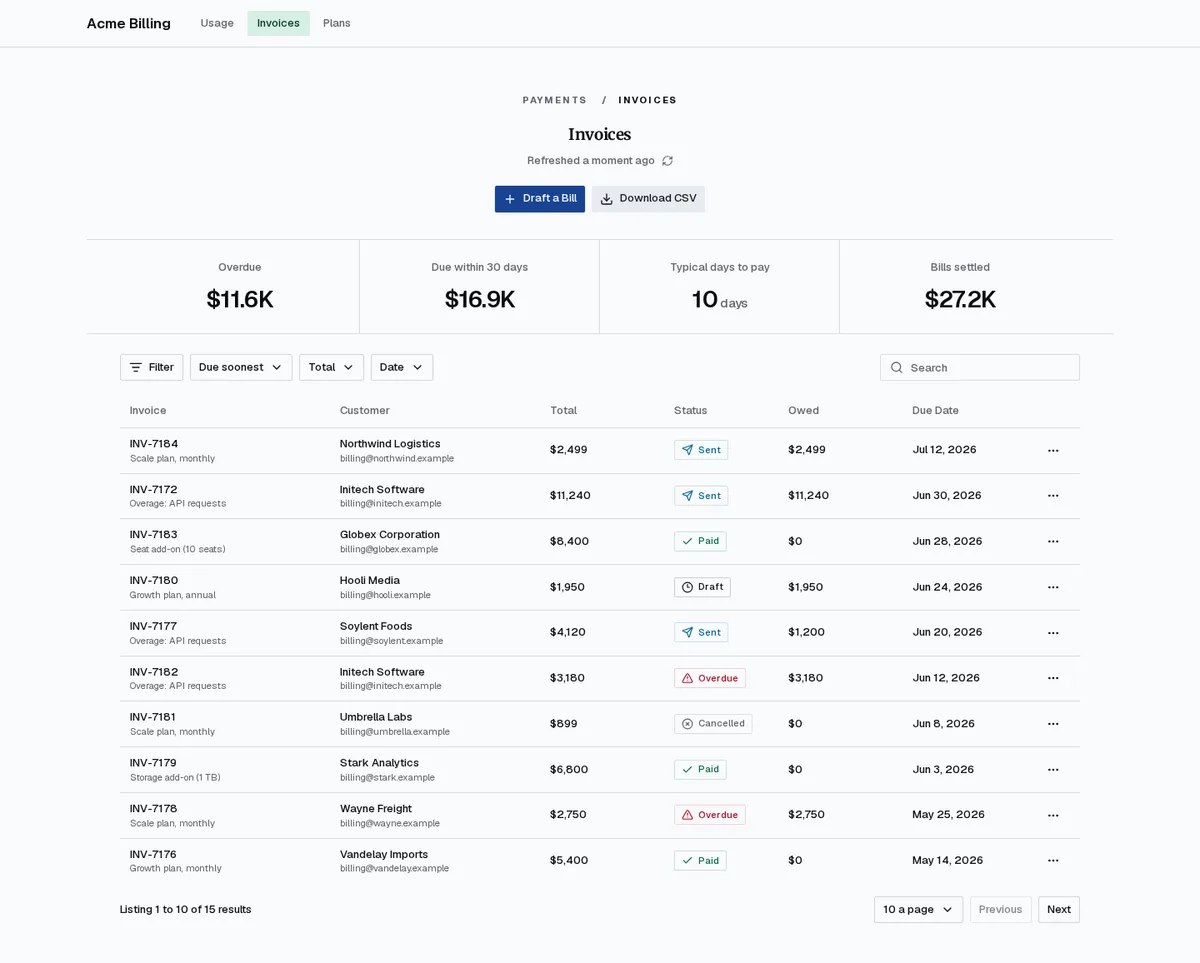
Invoices
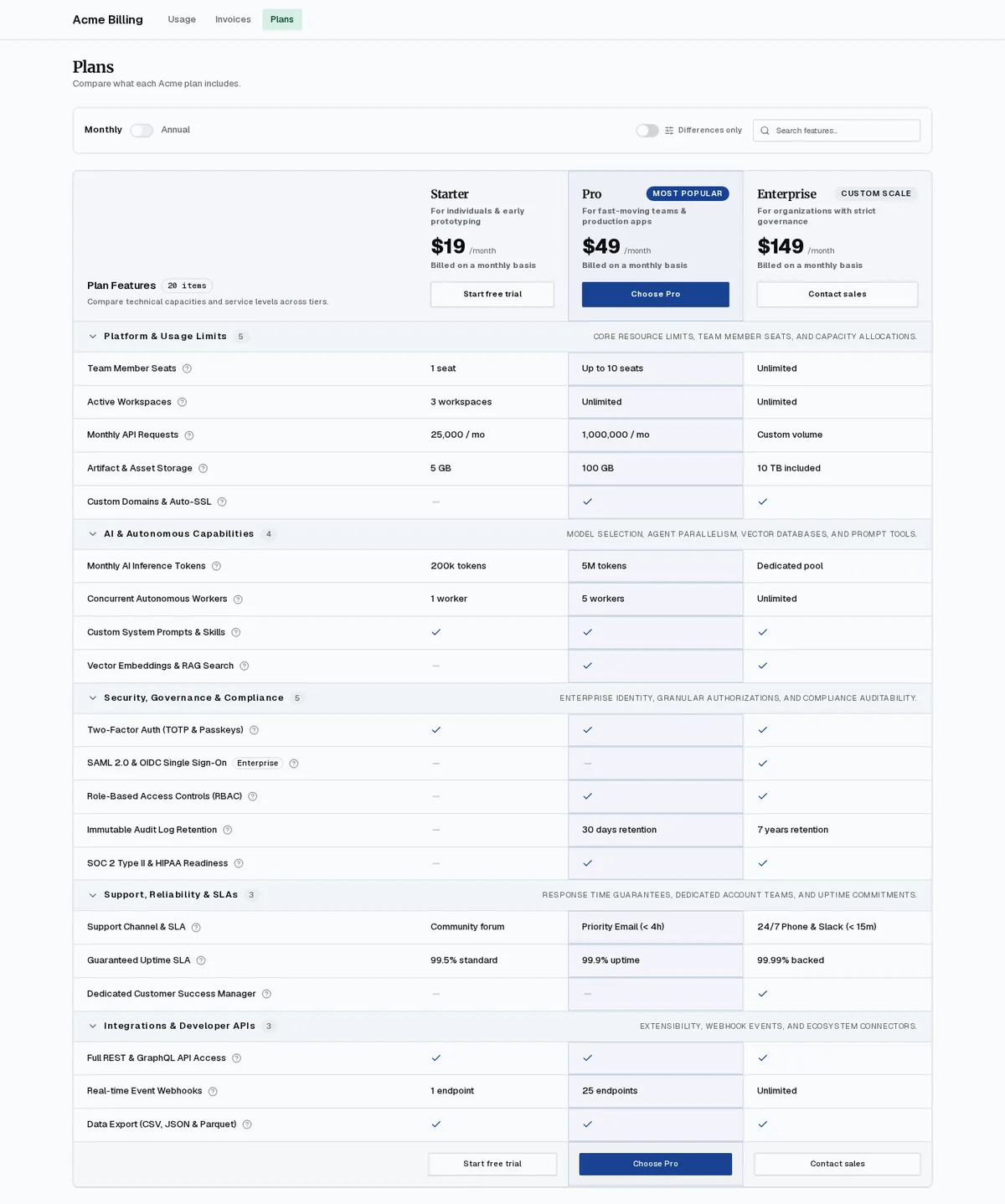
Plans
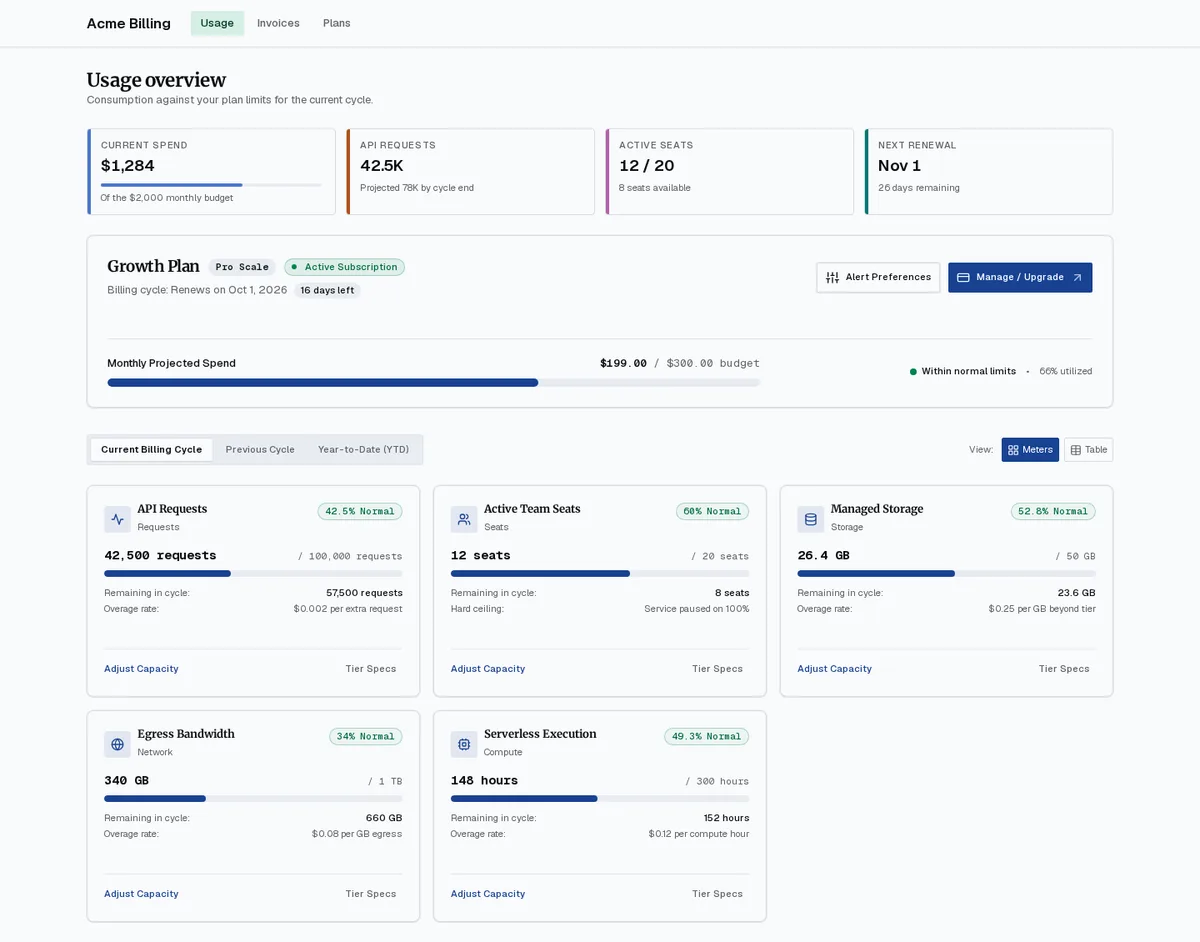
Usage overview
The parts and where they run
1 · Our server, token-protected
Private registry
Serves every component, template screen and blueprint as a shadcn registry item. Used only while installing.
2 · Your machine, in the project
agentic-ui CLI
init connects the registry and profiles the project; theme apply writes your theme; add installs a component through shadcn and adapts it to your tokens.
3 · The kit download
Semantic catalog
Describes every component for machines: intent, data shape, quality, what to keep and what to replace.
4 · Your machine, launched by your MCP client
MCP server
9 read-only tools that search and explain the catalog and resolve themes. It never writes files.
5 · .claude/skills in the project
Agent skills
Greenfield, rework, extend and audit: each loads the project context, applies the theme first and ends with an inspect step.
What changes in your project
9 files the tools write, and what each holds
| File | Written by | What it holds |
|---|---|---|
| ui-kit.config.yaml | agentic-ui init | Project settings: mode, variant, reuse threshold, motion profile, protection rules and registry. |
| .ui-kit/project-profile.json | agentic-ui analyze | Routes, layout, data layer, forms, tables and the business-logic files the tools must not touch. |
| .ui-kit/design-dna.json | agentic-ui dna | Your colors, radius, spacing, density, typography, motion and icons, applied on every install. |
| components.json | agentic-ui init | The @agentic-ui registry entry, with the token sent as a Bearer header from your environment. |
| AGENTS.md | agentic-ui init | A block telling coding agents to check the catalog before writing new UI. |
| .mcp.json | agentic-ui init | The agentic-ui MCP server entry your MCP client launches on demand. |
| agentic-ui-theme.css | agentic-ui theme apply | Your theme from the Theme Studio: CSS variables only, imported once from your entry CSS and recorded in ui-kit.config.yaml. |
| .claude/skills/agentic-ui-* | install-skills.mjs | The four agent skills and their scripts. |
| components/… | agentic-ui add | The component's source files, plus a report in .ui-kit/adaptations/<component>.md. |
Try it in your project: installation guide · For agents